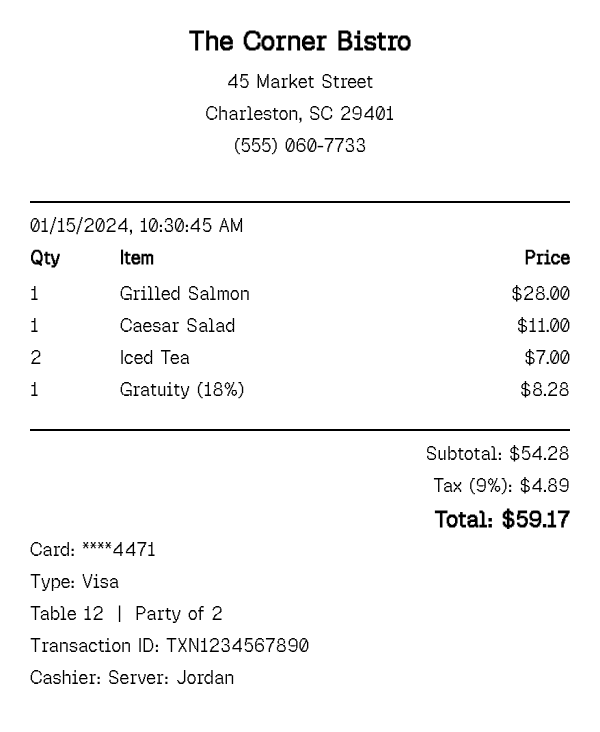
A sit-down restaurant check has a few fixtures a fast-food order slip does not: a server name, a table number, and a gratuity line that is usually calculated as a percentage of the food total, not the total after tax. This generator handles all three.
Restaurant Receipt Generator
What Is a Restaurant Receipt?
A restaurant receipt itemizes a dine-in meal — appetizers, entrees, drinks, sides — the way a table check actually prints, along with details a quick-service order slip usually skips: the server's name, a table number, and party size. Because gratuity is a standard part of a sit-down bill in a way it is not for most other purchases, the receipt typically shows it as its own line, calculated off the pre-tax food total.
Tax also behaves a specific way on a restaurant check: it applies to the food and drink subtotal, not to the tip, since gratuity is a separate payment to the server rather than a taxable sale. This generator follows that convention — enter your menu items and let the subtotal and tax calculate from them, then add gratuity as its own line so the receipt reads the way an actual dinner check does. Some checks also print a shared-plate or split-item note, or an automatic gratuity line for parties above a certain size, and either can be added as its own item if that applies to the meal you are documenting.
How to Make a Restaurant Receipt
- 1
Add each menu item as its own line
List appetizers, entrees, sides, and drinks individually with their menu price and quantity — a shared appetizer or a round of drinks for the table works the same way as any other item, priced per the quantity ordered.
- 2
Set the server, table number, and party size
Use the custom message field to record who served the table, the table number, and how many people were in the party — the details that distinguish a dine-in check from a to-go order slip.
- 3
Add gratuity as its own line item
Calculate the tip off the pre-tax food total (commonly 15–20%) and add it as a separate line item so it is shown clearly rather than folded into the food total or the tax calculation.
- 4
Set the tax rate and export the receipt
Set the local sales tax rate so it applies to the food and drink subtotal, then download the finished check as a print-ready PDF for an expense report or your own dining records.
Why Use Our Restaurant Receipt Generator?
Built for a full dine-in check. appetizers, entrees, sides, and drinks itemized the way a real table check lists them, not a flattened single order.
Server, table, and party size fields. record the details a sit-down receipt includes that a counter-service slip does not.
Gratuity as its own line. add tip separately from the food total and tax, matching how a dinner check is actually structured.
Correct tax handling. sales tax applies to the food subtotal, not the gratuity, the same way it works on a genuine restaurant bill.
Clean formatting for expense reports. a clear, itemized layout that reads well when attached to a reimbursement claim or travel expense report, with each course and charge easy to trace back to the original meal.
Free PDF download, no signup. generate and export as many dining receipts as you need at no cost.
Who Uses a Restaurant Receipt?
Business travelers documenting client or team dinners
submitting an itemized meal receipt for expense reimbursement, especially when the original was lost or faded.
Freelancers and self-employed diners
recording business-meal costs for tax deduction purposes, where an itemized record with the client or purpose noted supports the claim better than a card statement alone.
Event and hospitality coordinators
documenting a group dinner or catered sit-down meal for a client invoice or post-event expense reconciliation.
Diners replacing a lost or damaged check
recreating the details of a specific meal for personal budgeting or a reimbursement request when the paper copy did not survive.
Restaurant Receipt vs Parking Receipt
A restaurant receipt documents a sit-down meal — multiple menu items, a server and table reference, tax on the food subtotal, and gratuity as its own line — usually one of several receipts a business traveler collects on a single trip, and typically the most detailed of them.
A parking receipt documents a single, much simpler transaction — a rate, a duration, and a location — with no items, no server, and no tip, but it shows up on the same expense reports and trip itineraries as a restaurant check, often for the same trip and even the same evening.
Both are common line items on a single travel expense report, but they are structured for very different transactions. If you are documenting a meal, this page is the right one. If you are documenting where and how long a vehicle was parked, use the parking receipt instead.
Tips for Restaurant Receipts
- Calculate gratuity off the pre-tax food total, not the post-tax total — that is how most sit-down restaurants compute a suggested tip, and mismatched math is the easiest way for a receipt to look off to anyone reviewing it.
- Include the server's name and table number even if they seem unimportant — expense report reviewers and the diners themselves often use them to confirm which specific visit a receipt belongs to.
- For shared items like appetizers or a bottle of wine, list them once at the full price rather than splitting the price across guests — that matches how the actual check would have printed.
Frequently Asked Questions
Create Your Restaurant Receipt
Itemize the meal, add server and gratuity details, and download a print-ready PDF for your records or expense report.
Open the Editor