A repair bill reads differently from a retail receipt: labor is billed by the hour, parts are priced separately from the work to install them, and the vehicle itself — its VIN and mileage — is part of the record. This generator is built around that structure.
Mechanic Receipt Generator
What Is a Mechanic Receipt?
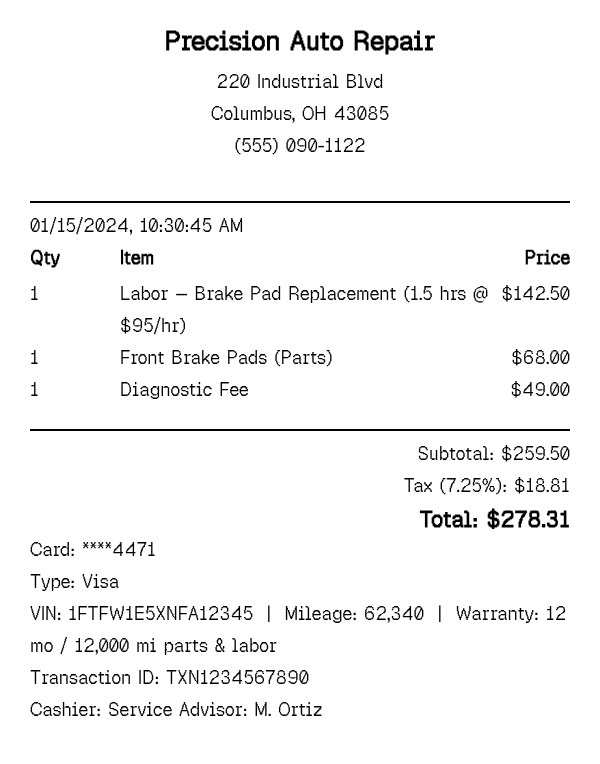
A mechanic receipt (or auto repair invoice) itemizes a repair or service job the way a shop actually bills it: parts and labor as separate line items rather than one combined charge, labor priced as hours multiplied by a shop rate, and often a flat diagnostic or inspection fee charged before any repair work begins. Most also reference the vehicle directly — VIN and current mileage — since the receipt doubles as part of the car's service history, not just a payment record.
Warranty terms are a standard fixture too: many shops guarantee parts and labor for a set period or mileage (commonly 12 months / 12,000 miles), and that guarantee is usually printed directly on the receipt so the customer has it on hand if the same issue recurs. This generator supports all of that — a parts/labor split, hourly labor billing, VIN and mileage fields, and a warranty line — instead of forcing a repair job into a flat, single-item retail format. Larger jobs often list several parts and multiple labor lines on one invoice — a brake job, for instance, might separately bill pads, rotors, and brake fluid alongside the labor to install each — and the generator handles as many line items as the job actually required.
How to Make a Mechanic Receipt
- 1
List labor and parts as separate line items
Add a labor line describing the work performed with hours and hourly rate (for example, "Labor — Brake Pad Replacement, 1.5 hrs @ $95/hr"), then add each part used as its own line with its own price, rather than folding everything into one repair charge.
- 2
Add the diagnostic fee, if one applies
If the shop charged a flat fee to diagnose the issue before any repair began, add it as its own item — many shops waive this fee if the customer proceeds with the recommended repair, which you can reflect by leaving it off or pricing it at $0.
- 3
Record the VIN, mileage, and warranty terms
Use the custom message field to note the vehicle's VIN, the mileage at the time of service, and the warranty period on parts and labor — the details that make the receipt useful as a service record, not just a payment slip.
- 4
Set the shop details and payment method, then export
Fill in the shop name, address, and service advisor or technician name, choose the payment method, and download the finished invoice as a print-ready PDF for the customer's records or your own shop files.
Why Use Our Mechanic Receipt Generator?
Parts and labor split cleanly. each is its own line item, billed the way a real shop invoice separates materials from work performed.
Hourly labor billing built in. describe labor with hours and rate directly in the line item, matching how shops actually price a repair.
VIN and mileage fields. tie the receipt to the specific vehicle and its odometer reading at time of service, which a generic item receipt has no room for.
Warranty terms included. print the parts-and-labor guarantee period directly on the receipt so the customer has it without a separate document.
Diagnostic fee as its own line. show a flat inspection or diagnostic charge separately from repair labor, matching common shop billing practice.
Free, print-ready PDF. export a clean invoice for the customer or your own shop records with no signup required.
Who Uses a Mechanic Receipt?
Independent repair shop owners
issuing itemized invoices to customers without a dedicated shop-management billing system.
Mobile mechanics and freelance technicians
billing for on-site repairs where parts and labor need to be documented clearly for the customer.
Vehicle owners documenting service history
keeping a personal record of repairs, parts replaced, and mileage at each service for resale or warranty purposes.
Fleet and rental vehicle managers
tracking maintenance costs and warranty coverage across a fleet, reconciled against each vehicle's service record.
Mechanic Receipt vs Gas Receipt
A mechanic receipt documents a repair or service job — parts and labor billed separately, often across multiple line items, tied to a specific VIN and mileage reading, and covering a single service visit that can range from a quick fix to a multi-hour job. It is a detailed, lower-frequency record compared to routine vehicle expenses.
A gas receipt documents a routine fuel purchase — gallons and price per gallon, usually a single line item, generated every time the tank is filled rather than at a service appointment. It is a fast, high-frequency, low-detail record by comparison.
Both are vehicle-expense documents that often sit side by side in the same mileage log or fleet report, but they cover different kinds of spending: keeping the car running (fuel) versus fixing or maintaining it (repair work). If you are billing or documenting repair work — parts, labor, diagnostics, warranty — this page is the right one. If you are recording a fill-up, use the gas receipt instead.
Tips for Mechanic Receipts
- Always separate parts from labor, even for small jobs — a combined line item is harder to dispute or verify than two clearly priced ones.
- Include the mileage at time of service even when it is not required — it is one of the most useful fields on the receipt for resale history and future warranty claims.
- State warranty terms in specific numbers (months and mileage) rather than "standard warranty" — vague terms are the most common source of disputes on repair work.
Related Templates
No dedicated auto-repair shop template exists in our brand library yet, so these are the closest related service and auto-parts pages.
Frequently Asked Questions
Create Your Mechanic Receipt
Itemize parts and labor, add the VIN and mileage, and download a print-ready repair invoice.
Open the Editor