Design mockups, test datasets, and prop departments all need something that looks like a real receipt without being tied to a real transaction. This tool builds that sample data — laid out like an authentic receipt, always marked as a sample.
Fake Receipt Generator
What Is a Fake Receipt Generator?
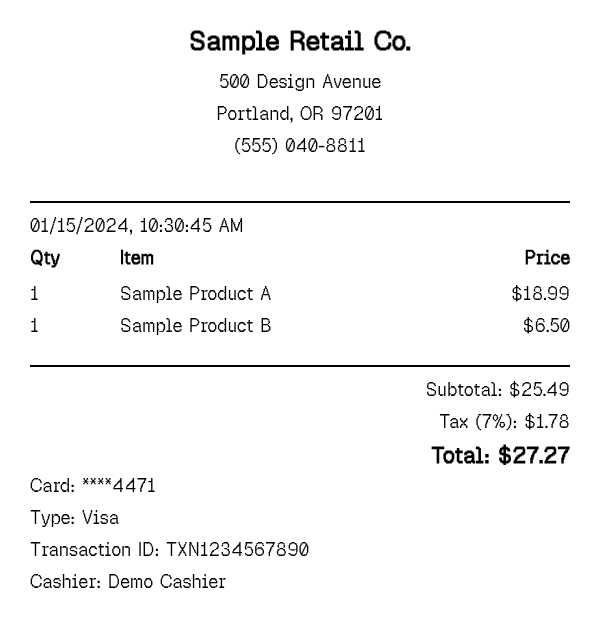
A fake receipt generator produces sample, placeholder receipt images and PDFs that follow a realistic receipt layout — store header, itemized lines, subtotal, tax, payment method — without representing an actual purchase. It exists for cases where you need data that looks like a receipt rather than a record that documents one: a checkout screen mockup, a synthetic dataset for a scanning model, a background prop, a slide in a bookkeeping lesson.
Every export from this tool carries a visible "SAMPLE" watermark by default, and it is built and positioned specifically for design, testing, educational, and prop use. Our Terms of Service prohibit using generated receipts to misrepresent a purchase to a retailer, employer, insurer, or any other party — this generator is a data and design tool, not a way to fabricate proof of a transaction that did not happen. Think of it the same way you would think of a stock-photo placeholder or Lorem Ipsum text: structurally realistic, deliberately generic, and never intended to stand in for a genuine document.
How to Generate a Sample Receipt
- 1
Pick the fields your mockup or dataset needs
Decide what the sample has to include — a logo and store header for a design mockup, a full items list with varied formatting for an OCR test set, or a specific line-item style for a prop. Enable only those sections.
- 2
Fill in representative, non-identifying sample data
Use placeholder store names, generic item descriptions, and round or randomized prices rather than a real business or a real purchase you are trying to document — the goal is realistic structure, not a copy of an actual transaction.
- 3
Match the layout to where the sample will be used
Set thermal-width formatting (80mm or 58mm) if you are replicating a physical printed prop, or standard paper sizing if the export is going straight into a screen mockup or a slide deck.
- 4
Export and drop it into your design file, dataset, or prop kit
Download as PDF or use the rendered preview directly. For OCR or scanning-model work, regenerate with different items, spacing, and totals each time to build a varied set of samples instead of duplicating one layout.
Why Use Our Fake Receipt Generator?
Realistic, authentic-looking layout. thermal-receipt spacing, monospace formatting, and standard sections (header, items, totals, payment) instead of a generic invoice template.
Fast iteration for multiple samples. regenerate with new items, prices, or store details in seconds — useful when you need dozens of varied samples, not just one.
Built-in SAMPLE watermark. every free export is clearly marked as a sample by default, keeping mockups and test data visually distinct from a real receipt.
Works for physical and digital output alike. export at thermal-printer width for a printed prop, or standard page sizing for a screen mockup or slide.
No signup or install. the generator runs entirely in your browser, which matters when you just need one quick sample asset and nothing more.
Consistent, predictable structure. the same section layout every time makes it easy to script or repeat generation for larger test datasets, so a scanning model sees a stable baseline format even as item content varies.
Who Uses a Fake Receipt Generator?
UI/UX designers
building checkout confirmation screens, receipt-email mockups, or e-commerce design comps that need realistic placeholder receipt content.
Developers and QA teams
generating test fixtures for OCR and receipt-scanning pipelines, payment-flow integration tests, or sample data for a demo environment, where real customer receipts would be inappropriate to use.
Educators and instructional designers
producing course material — bookkeeping lessons, accounting exercises, or examples of how to read an itemized receipt.
Film, theatre, and prop departments — and people recreating a receipt they genuinely lost
set dressing and background props that need a believable receipt on screen or stage, and individuals who need to reconstruct the details of a lost receipt for their own records.
Fake Receipt Generator vs Receipt Maker
This page is about producing sample data that looks like a receipt for design, testing, education, or props — the content is meant to be understood as representative or placeholder, not as documentation of one specific real purchase. Nothing here is asserted to have actually happened.
The receipt maker, by contrast, is for building a real record of a transaction you are actually documenting — your own business, a real freelance job, a genuine vendor — starting from a blank layout instead of a brand template. The line items, prices, and dates on that page are meant to reflect something that genuinely took place.
If you are generating placeholder or sample content, stay here. If you are documenting something that actually happened, use the receipt maker instead — the underlying editor is the same, but the intent behind each page, and what the output is meant to represent, is not.
Tips for Generating Sample Receipts
- Leave the SAMPLE watermark visible on anything shared outside your own design file or codebase, so it reads unambiguously as a mockup to anyone who sees it.
- For OCR or scanning-model test sets, vary item counts, spacing, and totals across each export rather than reusing one layout — a model trained on a single fixed format will not generalize.
- Match paper width to the target medium: thermal 80mm/58mm for a physical prop or printer test, standard sizing for anything that only needs to look right on a screen.
Related Templates
Useful as varied real-world reference layouts if you need multiple visually distinct sample formats for a mockup set or test dataset.
Frequently Asked Questions
Generate a Sample Receipt
Build realistic mockup data for design, testing, or props — export in seconds, watermarked as a sample by default.
Open the Editor