A single paid parking transaction has its own small set of fields — entry and exit time, hourly or flat rate, and often a space or gate number — that do not belong on a general retail receipt. This generator is built around exactly that transaction.
Parking Receipt Generator
What Is a Parking Receipt?
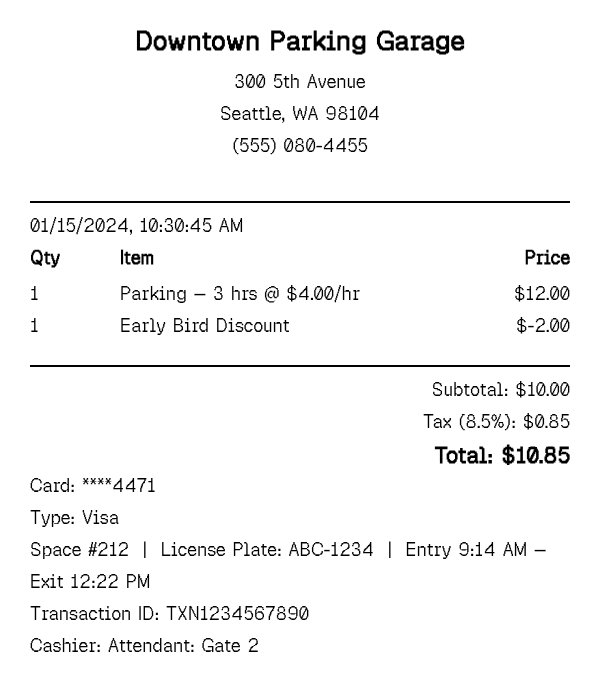
A parking receipt documents a single paid parking transaction — a garage, lot, or metered space charged by the hour or as a flat rate, for one visit rather than a recurring arrangement. It typically shows the entry and exit time (or the total duration), the rate applied, the location, and often a space number or gate/ticket ID, along with any discount applied, such as a merchant validation.
This is a different transaction from a monthly parking permit: a permit is a recurring charge for reserved or ongoing access to a space, billed on a schedule, while a parking receipt documents one specific paid visit — the kind generated at a garage exit gate or a pay-and-display kiosk. This tool is built for that single-visit case: enter the rate and duration, and it produces the transaction record for that one parking session. Rates themselves vary widely by format — a flat all-day rate at an airport lot, a graduated hourly rate that caps at a daily maximum in a downtown garage, or a simple per-hour meter charge — and the generator supports all three by letting you describe the rate structure directly in the line item.
How to Make a Parking Receipt
- 1
Enter the rate and duration
Add the parking charge as a line item describing the rate and length of stay (for example, "Parking — 3 hrs @ $4.00/hr"), matching how most garage and lot receipts price a single visit.
- 2
Apply any discount or validation
If a merchant validated the ticket or an early-bird or event rate applied, add it as its own discount line item so the receipt shows the rate that was actually charged, not just the standard posted rate.
- 3
Record the space number, license plate, and entry/exit time
Use the custom message field to note the space or level number, the vehicle's license plate, and the entry and exit times — the details that make the receipt a usable record of exactly which visit it documents.
- 4
Set the location and payment method, then export
Fill in the garage or lot name and address, choose the payment method, and download the finished receipt as a print-ready PDF for an expense report or your own records.
Why Use Our Parking Receipt Generator?
Built for a single paid visit. rate and duration structured the way a garage or lot actually prices one parking session, not a recurring charge.
Space number and license plate fields. tie the receipt to a specific vehicle and location the way a real garage ticket does.
Entry and exit time support. record exactly when the vehicle arrived and left, which most reimbursement forms ask for directly.
Validation and discount line items. show a merchant validation or early-bird rate as its own line so the final charge is clearly explained.
Clean formatting for expense reports. a compact, itemized layout that fits neatly alongside other trip receipts — restaurant checks, ride receipts, hotel folios — in a single reimbursement claim.
Free PDF export, no signup. generate as many single-visit parking receipts as your trip or expense report needs.
Who Uses a Parking Receipt?
Business travelers and commuters
documenting airport, garage, or downtown parking costs for an employer expense reimbursement claim, often alongside a rental car or rideshare receipt from the same trip.
Self-employed workers and rideshare drivers
recording parking costs tied to client visits or work trips for self-employment tax deductions.
Event attendees and exhibitors
documenting parking costs for a conference, trade show, or client event as part of a travel expense report.
Property managers and parking operators
issuing a transaction receipt to a visitor or tenant for a single paid parking session rather than a monthly permit.
Parking Receipt vs Restaurant Receipt
A parking receipt documents a single, simple transaction — a rate, a duration, and a location, with no items, no server, and no tip — often generated automatically at a garage exit gate rather than handed over by a person. It is usually the shortest, least detailed receipt on a given trip expense report.
A restaurant receipt documents a sit-down meal — multiple itemized menu items, a server and table reference, tax on the food subtotal, and gratuity as its own line — a more detailed record covering one dining occasion, typically handed to the customer directly rather than printed automatically.
The two frequently appear on the same trip: park the car, walk to dinner, and both receipts end up in the same expense report by the end of the evening. If you are documenting where a vehicle was parked and for how long, this page is the right one. If you are documenting a meal, use the restaurant receipt instead.
Tips for Parking Receipts
- Record entry and exit times whenever you can, even if the garage only printed a duration — most expense systems and reimbursement forms ask for both, not just the total hours.
- If a validation or discount applied, show it as its own line rather than just entering the final discounted rate — it explains why the charge differs from the posted rate.
- Keep the location name specific (garage or lot name and cross street, not just "downtown parking") — a vague location is the most common reason a parking receipt gets questioned on an expense report.
Related Templates
For a recurring monthly or annual parking arrangement rather than a single paid visit, see the Parking Permit Receipt template above.
Frequently Asked Questions
Create Your Parking Receipt
Add the rate, duration, and location, then download a print-ready PDF for your expense report or records.
Open the Editor