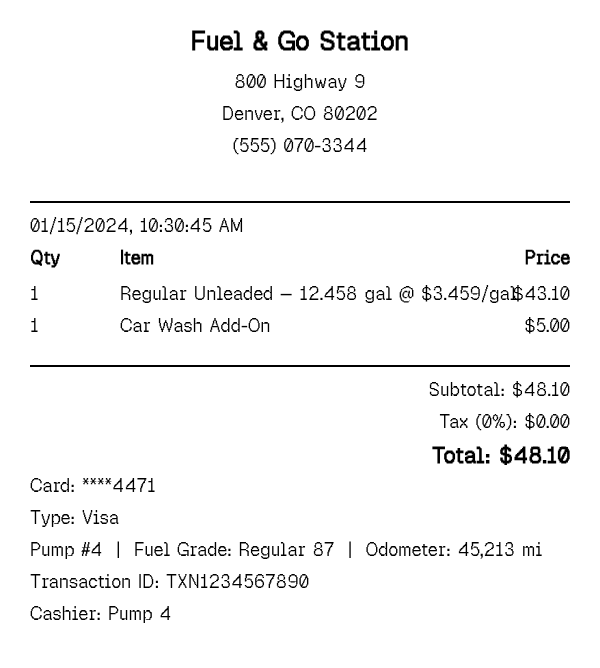
Fuel receipts follow a format that a generic itemized receipt does not: gallons pumped, price per gallon, fuel grade, and often the pump number and odometer reading. This generator is built around exactly those fields.
Gas Station Receipt Generator
What Is a Gas Station Receipt?
A gas station receipt records a fuel purchase in units a general retail receipt does not use — gallons (or liters) pumped, price per gallon, and fuel grade (regular, mid-grade, premium, or diesel) instead of a flat item price and quantity. Most also print the pump number, the station's location, and the payment method used at the pump, and many drivers add the odometer reading by hand for their own mileage records even when the pump itself does not print one.
Because fuel is taxed and priced differently from general merchandise, the totals section works differently too: the price per gallon already reflects fuel tax in most U.S. states, so there is often no separate sales-tax line the way there is on a grocery or retail receipt. This generator reflects that — you set gallons and price per gallon, and it builds the line item and total the way an actual pump receipt would. Many stations also print a rewards or loyalty line — points earned, a per-gallon discount for a fuel card, or a savings amount — directly beneath the fuel total, and a convenience-store add-on like a car wash or a snack purchase often rides along on the same ticket when it was paid for at the pump.
How to Make a Gas Station Receipt
- 1
Enter the fuel grade and gallons pumped
Choose the grade — regular, mid-grade, premium, or diesel — and enter the number of gallons (or liters) purchased. This becomes the primary line item on the receipt, the same way it prints at the pump.
- 2
Set the price per gallon
Enter the price per gallon for that fill-up; the line total (and the receipt subtotal) calculates automatically from gallons × price per gallon, matching how pump totals are actually computed.
- 3
Add the pump number and odometer reading
Use the custom message field to record the pump number and current odometer reading — the two details that turn a fuel purchase into usable mileage documentation, since neither appears in a standard item line.
- 4
Set the station details and payment method, then export
Fill in the station name, address, and city/state, choose card or cash as the payment method, and download the finished receipt as a print-ready PDF for your expense report or mileage log.
Why Use Our Gas Receipt Generator?
Built for gallons and price-per-gallon, not generic items. the fuel line item is structured the way an actual pump receipt prices it, instead of a flat quantity-times-price entry.
Fuel grade included. regular, mid-grade, premium, and diesel are all supported, so the receipt matches what was actually pumped.
Room for pump number and odometer. a dedicated line for the details a mileage log actually needs, which most templates leave out entirely.
Fleet-ready formatting. clean, consistent layout makes it easy to batch-produce multiple fill-up receipts for a vehicle fleet's monthly expense report.
No separate tax-rate guesswork. fuel receipts price tax into the per-gallon rate rather than adding it after the fact, and this generator follows that convention.
Free PDF export, no signup. download as many fill-up receipts as you need without creating an account.
Who Uses a Gas Station Receipt?
Employees claiming mileage reimbursement
documenting individual fill-ups to support a per-mile or actual-fuel-cost reimbursement claim submitted to an employer.
Fleet managers
tracking fuel spend across multiple company vehicles, often reconciling pump receipts against a fuel card statement.
Self-employed drivers and rideshare or delivery drivers
recording fuel costs for vehicle-expense tax deductions at the end of the year.
Small business owners with a work vehicle
keeping fuel purchases separate from personal spending for bookkeeping and tax-deduction purposes.
Gas Receipt vs Mechanic Receipt
A gas receipt documents a single fuel purchase — gallons, price per gallon, and grade, priced per transaction at the pump. It is a fast, recurring, low-dollar record, usually one line item, generated every time a vehicle is filled up, and most drivers accumulate a stack of them over a single month of ordinary driving.
A mechanic receipt documents a repair or service job — parts and labor billed separately, often with a diagnostic fee, warranty terms, and a mileage or VIN reference tied to one specific service visit rather than a routine purchase. It is a much less frequent, higher-detail record than a fill-up receipt, and it usually covers a single event rather than a recurring one.
Both are vehicle-related expenses that commonly appear side by side on the same mileage log or fleet expense report, but they document fundamentally different things: fuel consumed versus work performed. If you are recording a fill-up, this page is the right one. If you are documenting a repair, oil change, or inspection with parts and labor, use the mechanic receipt instead.
Tips for Gas Station Receipts
- Record the odometer reading at every fill-up, not just some — a mileage log with gaps is far less useful for reimbursement or tax purposes than a complete one, and most employers and tax preparers will ask for the missing entries anyway.
- Keep the price per gallon accurate to the fill-up's actual date and region — fuel prices vary enough by week and state that a rounded or reused number can look inconsistent on an expense report.
- If you are batching several fill-ups for one expense report, keep the station name and pump number fields consistent with your actual route so the set of receipts reads coherently together.
Frequently Asked Questions
Create Your Gas Station Receipt
Add your fuel grade, gallons, and price per gallon, then download a print-ready PDF for your mileage log or expense report.
Open the Editor