Issue a receipt for a customer payment using a small-business sample you can edit. Start with two service line items, add the customer and invoice reference, and review the payment details before exporting.
Business Receipt Maker
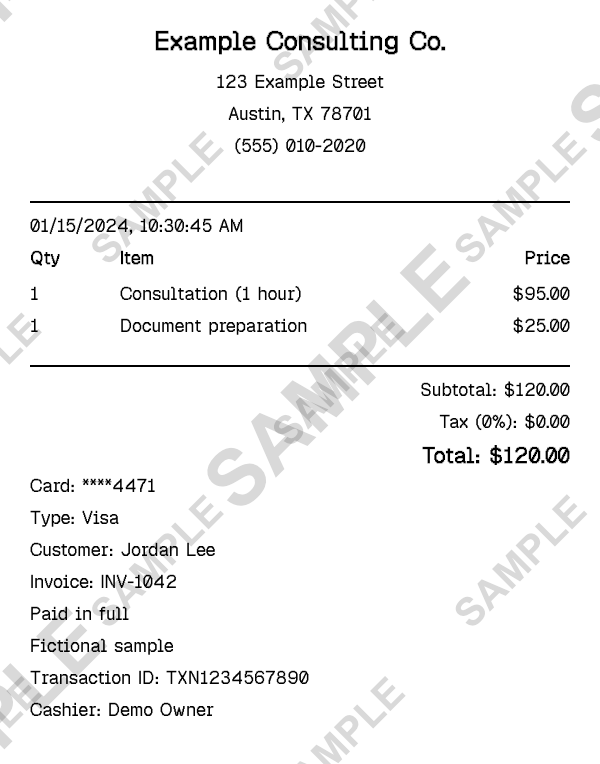
Fictional $120 service-payment example. Free downloads include a SAMPLE watermark; Pro removes it.
A Receipt for a Payment Your Business Received
A business receipt records money received from a customer. It connects the seller, the items or services supplied, the payment date and the amount paid. This template starts with a fictional consulting business and a $120 payment, rather than a branded retail-store purchase.
The sample includes one consultation at $95 and document preparation at $25. It uses a zero tax rate for demonstration, with a customer name, invoice reference and paid-in-full note in the custom message. Replace every sample detail and set the tax treatment appropriate to your transaction. ReceiptCreate does not verify that a payment occurred.
How to Make a Business Receipt
- 1
Add your business identity
Open the sample in the editor. In Header, replace the fictional business name, address and phone number with your own details. Add your logo if you use one.
- 2
Describe the goods or work supplied
In Items, replace Consultation and Document preparation with the actual products or services. Set quantities and unit prices, then check the calculated subtotal, tax and total.
- 3
Identify the customer and payment
In Custom Message, replace the customer name and invoice reference. Use a paid-in-full note only when it is accurate. Set the payment date, method and transaction reference in their editor sections.
- 4
Review and export
Confirm that the receipt total matches the payment being recorded. Download a free watermarked PDF to review the layout. Pro removes the watermark for a clean export.
What This Business Template Includes
Editable business header. Put your own business name and contact details above the payment breakdown.
Itemized service example. The preset demonstrates separate consultation and preparation charges, with quantities and prices you can replace.
Customer reference. A custom-message section holds the customer name without adding it to a product description.
Invoice connection. Keep the original invoice number in the note so the receipt can be matched to your records.
Calculated totals. Review subtotal, tax and total as you change the line items; the sample tax rate is illustrative.
Try the actual editor. The preview uses the same preset that opens for editing, with free watermarked downloads and a paid watermark-removal option.
When to Use a Business Receipt
Independent consultants
Record a client payment for a completed consultation and related deliverables.
Service businesses
Give a customer an itemized record after work has been supplied and paid for.
Small retailers
Prepare a receipt for goods sold when a simple editable layout suits the transaction.
Freelancers
Match a completed project payment to a customer and an existing invoice reference.
Business Receipt or Invoice?
An invoice requests payment and can describe an amount still due. A receipt records a payment that has already been received. Keep the invoice reference on the receipt when the two documents relate to the same sale.
This preset is a paid-in-full example, not an invoice or an accounts-receivable ledger. It does not track balances, reconcile bank transactions or process a customer payment.
If your receipt needs many separate products rather than a service-payment example, the itemized receipt tool provides a different starting point. Both open in the same editor.
Before You Send the Receipt
- Replace the fictional customer, business, dates and reference numbers; keep the receipt reference consistent with your own records.
- Do not label an unpaid invoice paid in full. For a partial payment, describe only the amount received and keep any remaining balance in your accounting records.
- Check quantities, payment method and tax settings against the actual transaction. This sample does not determine your local receipt or tax requirements.
Related Templates
These are related service and payment templates. Choose the format that matches the payment you actually received.
Frequently Asked Questions
Create Your Business Receipt
Open the $120 service-payment sample, replace the customer and invoice details, and review your receipt in the existing editor. Free downloads include a watermark.
Open the Editor