Make a receipt for a cleaning payment you received. Start with an editable example that separates cleaning hours from supplies and records the customer, service address and date of the visit.
Cleaning Receipt Maker
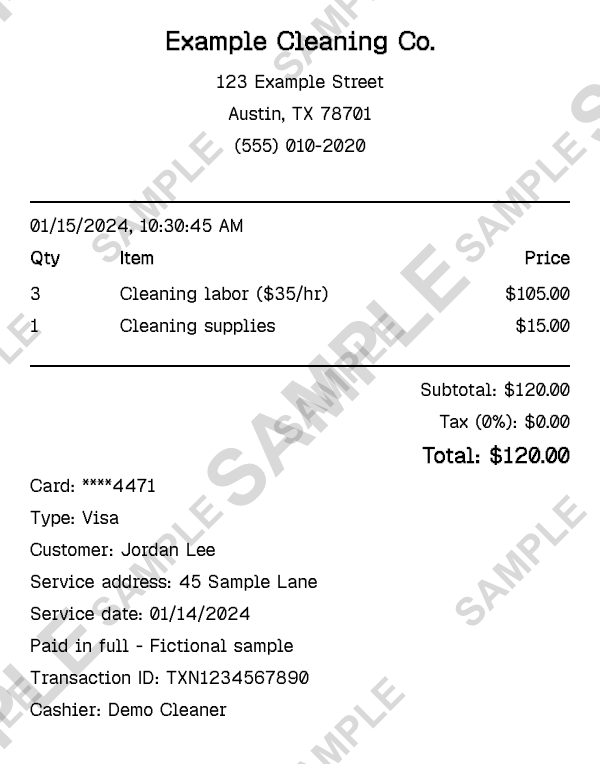
Fictional cleaning payment: 3 hours at $35 plus $15 supplies, total $120. Free downloads are watermarked; Pro removes it.
What Goes on a Cleaning Receipt?
A cleaning receipt connects a payment to a completed cleaning visit. Alongside your business details and the amount paid, include who paid, which property was cleaned and when the work took place. That makes the record more useful than a note that simply says cleaning.
This example lists three hours of cleaning at $35 per hour and a separate $15 supplies charge, for a $120 total. Customer, property and service-date notes are already filled with fictional details. Replace them with the actual job information and review the tax setting; the sample uses zero percent for illustration.
How to Make a Cleaning Receipt
- 1
Identify your cleaning business
Open the sample and replace the business header with your company name, contact details and logo if you use one. Keep the name consistent with the business that received payment.
- 2
Separate work from supplies
Edit Cleaning labor with the number of hours and hourly rate. Replace the supplies charge with the amount actually billed, or remove that line when supplies were included in the service price.
- 3
Add the customer and property
In Custom Message, replace the customer, service address and service date. If the payment date differs from the visit date, record the payment date in Date & Time and keep the visit date in the note.
- 4
Confirm payment and download
Check that the total matches the amount received and choose the actual payment method. Download a watermarked sample to review the layout; Pro removes the watermark for a clean PDF.
A Template Built Around the Cleaning Visit
Hours and rate. The quantity and price fields show how the labor charge was calculated, rather than hiding all work in one unexplained total.
Optional supply charges. Keep materials separate when they were billed separately, or delete the sample line for an all-inclusive fee.
Property reference. Put the service address in the custom note so a customer can match the payment to the right location.
Two dates when needed. Use the receipt date for payment and the custom-message date for the cleaning visit.
Editable item list. Rename or add work such as oven cleaning, carpet cleaning or a move-out clean when it was part of the job.
Actual editor preview. The sample shown here is exported from the same preset that opens in the editor.
Who Can Use This Cleaning Receipt?
Independent house cleaners
Give customers a record of the visit and payment without setting up a separate billing application.
Small cleaning teams
List the work billed and the property cleaned when preparing a customer receipt.
Move-out cleaning providers
Describe the completed visit and any separately charged tasks, using the actual service address.
Office cleaning businesses
Record the customer, premises and payment for a completed cleaning job or billed service period.
Cleaning Receipt or Cleaning Invoice?
Use a cleaning invoice to request payment for work. Use a cleaning receipt after receiving payment. Entering an amount in this editor does not charge the customer or verify that the payment occurred.
The service date explains when cleaning took place; the payment date explains when money was received. Keep both when they differ. This editor can display those notes, but it does not schedule visits or maintain a customer balance.
For a different kind of service payment, start with the general business receipt. The cleaning preset is the more specific choice when the location, visit date and labor breakdown matter.
Review the Job Details Before Sending
- Replace the sample hours and rate with what was actually billed. Use a quantity of one and the job fee for a fixed-price clean.
- Keep property details limited to what the customer needs to identify the service. Do not include entry codes or other access instructions.
- For a deposit or partial payment, describe only the amount received and remove any inaccurate paid-in-full label. Track the remaining balance separately.
Related Templates
For other payment types, choose the related format that describes the actual transaction.
Frequently Asked Questions
Create Your Cleaning Receipt
Open the cleaning-hours sample, replace the job and customer details, and review the result in the editor. Free downloads include a watermark.
Open the Editor